Beginner’s Guide to Shopping on Amazon

Beginner’s Guide to Shopping on Amazon
Shopping on Amazon is easy.
Shopping on Amazon correctly is different.
This complete beginner’s guide walks you step-by-step through:
- Creating your account
- Searching for products effectively
- Comparing listings
- Identifying trustworthy sellers
- Understanding pricing
- Finding real discounts
- Avoiding common mistakes
- Using tools like HighDeals.net to validate savings
If you’re new — or want to shop smarter — this is your foundation.
📚 Quick Navigation
Getting Started
Finding Products
Evaluating Before Buying
Saving Money
After Purchase
Creating an Amazon Account
To begin shopping:
- Visit Amazon
- Click “Sign In”
- Select “Create Account”
- Enter email and password
- Verify your email
Add:
- Shipping address
- Payment method
- Optional phone number
Understanding the Amazon Homepage
The homepage includes:
- Search bar (most important tool)
- Category menu
- Deal sections
- Personalized recommendations
The search bar is where most smart shopping begins.
Prime vs Non-Prime Shopping
Prime offers:
- Faster shipping
- Access to exclusive deals
- Streaming benefits
Non-Prime users can still:
- Access most products
- Use free shipping on qualifying orders
- Take advantage of coupons
Prime is convenient — but not required to shop effectively.
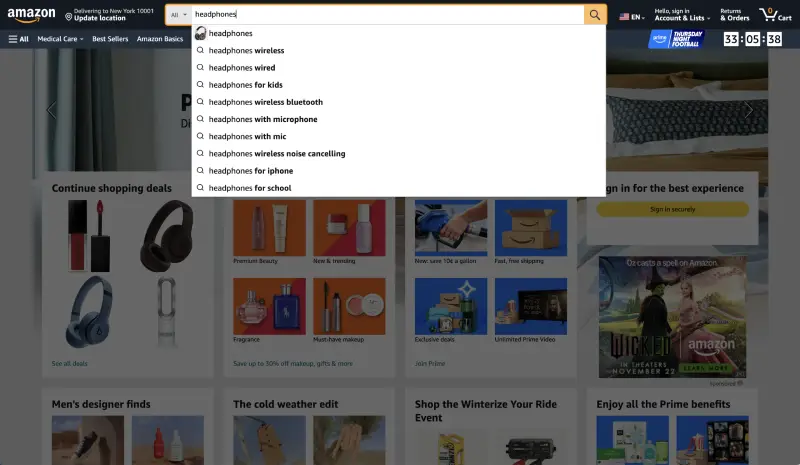
How to Search Effectively
Instead of typing:
“Headphones”
Type:
“Wireless noise cancelling headphones under $100”
Be specific.
Use keywords like:
- Budget
- 4K
- Lightweight
- Organic
- Professional
- 2026 model
Specific searches reduce irrelevant listings.
Using Filters and Sorting
After searching, use filters:
- Price range
- Brand
- Average customer review
- Prime eligibility
- Delivery speed
Sorting options:
- Featured
- Price: Low to High
- Avg. Customer Review
- Newest Arrivals
Understanding Product Listings
Each listing contains:
- Product images
- Title
- Price
- Ratings
- Seller information
- Shipping details
- Description
- Specifications
Look beyond the first image.
Scroll fully before deciding.
Reading Reviews the Right Way
Do not only check star rating.
Instead:
- Sort by “Most Recent”
- Read 3-star reviews
- Look for pattern complaints
- Check verified purchases
Common red flags:
- Repetitive generic language
- Overly emotional wording
- Sudden flood of 5-star reviews
Checking Seller Credibility
Click seller name.
Review:
- Seller rating percentage
- Number of reviews
- Time active on Amazon
- Return policy
Prefer:
- High rating (95%+)
- Long account history
- Fulfilled by Amazon (FBA)
Comparing Prices Properly
Many beginners make this mistake:
They see “30% off” and buy immediately.
Instead:
- Check historical pricing trends
- Compare similar listings
- Review competitor offers
Use external validation tools and curated discount platforms like HighDeals.net to confirm whether the discount reflects a true price drop or temporary inflation.
Finding Real Discounts
Real discounts often occur:
- During seasonal shifts
- When inventory is high
- During major sale events
- When competition increases
Artificial discounts may:
- Inflate list price
- Use anchor pricing
- Disappear quickly without historical change
Verification is key.
Using Coupons
On-page coupons appear under price.
Always:
- Click checkbox
- Confirm discount in cart
- Check final checkout screen
Coupons stack with:
- Gift cards
- Lightning Deals
- Subscribe & Save
Understanding Lightning Deals
Lightning Deals:
- Time-limited
- Quantity-limited
- High urgency
Before buying:
- Compare with historical lows
- Confirm it’s not regular price disguised as deal
- Check review quality
Using Gift Cards Strategically
Gift cards:
- Apply after discounts
- Do not cancel coupons
- Can stack with most promotions
Best practice:
Validate discount first via HighDeals.net, then apply gift balance.
Tracking Orders
After checkout:
- Monitor tracking link
- Check estimated delivery date
- Enable delivery notifications
If package delayed:
- Contact seller
- Use Amazon support
- Request resolution if necessary
Returns and Refunds
Amazon return process:
- Go to Orders
- Select item
- Choose “Return”
- Print label or generate QR code
- Drop off at carrier location
Refund timelines vary.
Most refunds process within days after item received.
Avoiding Common Beginner Mistakes
- Buying without reading reviews
- Ignoring seller reputation
- Trusting “List Price” blindly
- Missing coupon checkbox
- Not comparing alternatives
- Ignoring return policies
- Impulse buying due to urgency
Beginner Smart Shopping Framework
Follow this checklist:
- Search specifically
- Filter properly
- Compare listings
- Check seller credibility
- Read reviews intelligently
- Validate discount
- Stack coupons if available
- Confirm final checkout total
Repeat consistently.
Why Validation Matters
Amazon pricing changes frequently.
A deal may look strong — but historical data may show it’s average.
Before purchasing:
Check curated deal verification platforms like HighDeals.net to ensure the discount reflects real value rather than algorithmic fluctuation.
Smart shopping is not about speed.
It’s about informed timing.
Long-Term Smart Shopper Mindset
Over time, you will:
- Recognize price patterns
- Identify fake urgency
- Detect inflated MSRP anchors
- Spot seasonal cycles
- Understand seller behavior
Shopping becomes strategic — not reactive.
Final Summary
Amazon is powerful and convenient.
But beginners must learn:
- How search works
- How listings are structured
- How sellers compete
- How discounts are presented
- How to verify true savings
With the right approach, Amazon becomes:
A controlled purchasing system
Not an impulse marketplace
Use:
Patience
Comparison
Validation
Stacking
And trusted resources like HighDeals.net
To shop confidently and intelligently.
Closing Thoughts
Being a beginner is temporary.
Shopping intelligently is permanent.
Once you understand:
- How listings work
- How pricing works
- How sellers compete
- How discounts stack
You stop guessing.
And start optimizing.
Posts in this series
- Best Smart Home Gadgets Under $100 in 2025
- Apple AirPods 4 vs. Sony WF-1000XM6: Which Are Worth It?
- How to Stack Cashback and Coupons Like a Pro
- The Rise of AI-Powered Shopping Assistants in 2025
- How to Track Amazon Price Drops
- How to Stack Coupons on Amazon (Complete 2026 Savings Blueprint)
- 10 Amazon Shopping Hacks That Save Money
- How Amazon Pricing Algorithm Works
- How to Combine Gift Cards and Discounts on Amazon
- Beginner’s Guide to Shopping on Amazon